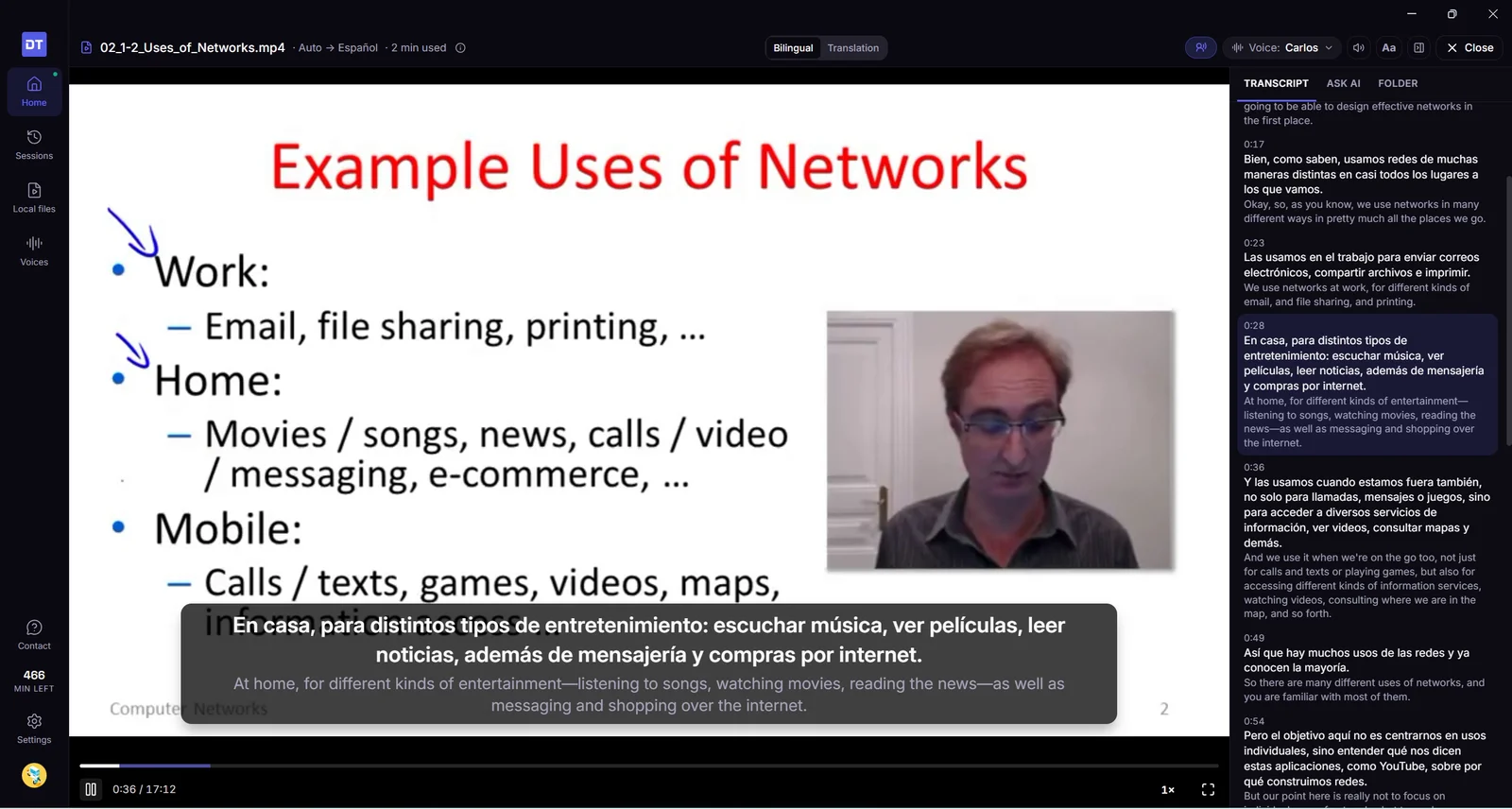
Open a video or audio file from your computer and DubTab subtitles and dubs it in its own player, prepared a little ahead so the voice keeps pace with the picture. What's prepared is saved on your computer, so watching it again is free. Courses pick up where you left off, Ask AI answers questions about the video, and you can search every transcript you have.
desktop local files courses AI history
New
Play a video file and hear it in your language. Open or drop a lecture, film or recording — MP4, MKV, MOV, WebM, MP3 and more — and DubTab subtitles, translates and dubs it in its own player. The dubbing is prepared a little ahead of where you are, so the voice keeps pace with the picture. The first lines take a moment; press Play now with the original sound if you'd rather not wait.
Watch it again for free. Subtitles and dubbing are saved on your computer as they're prepared. Anything already prepared plays again without using any minutes — and it stays free even if you switch to another voice.
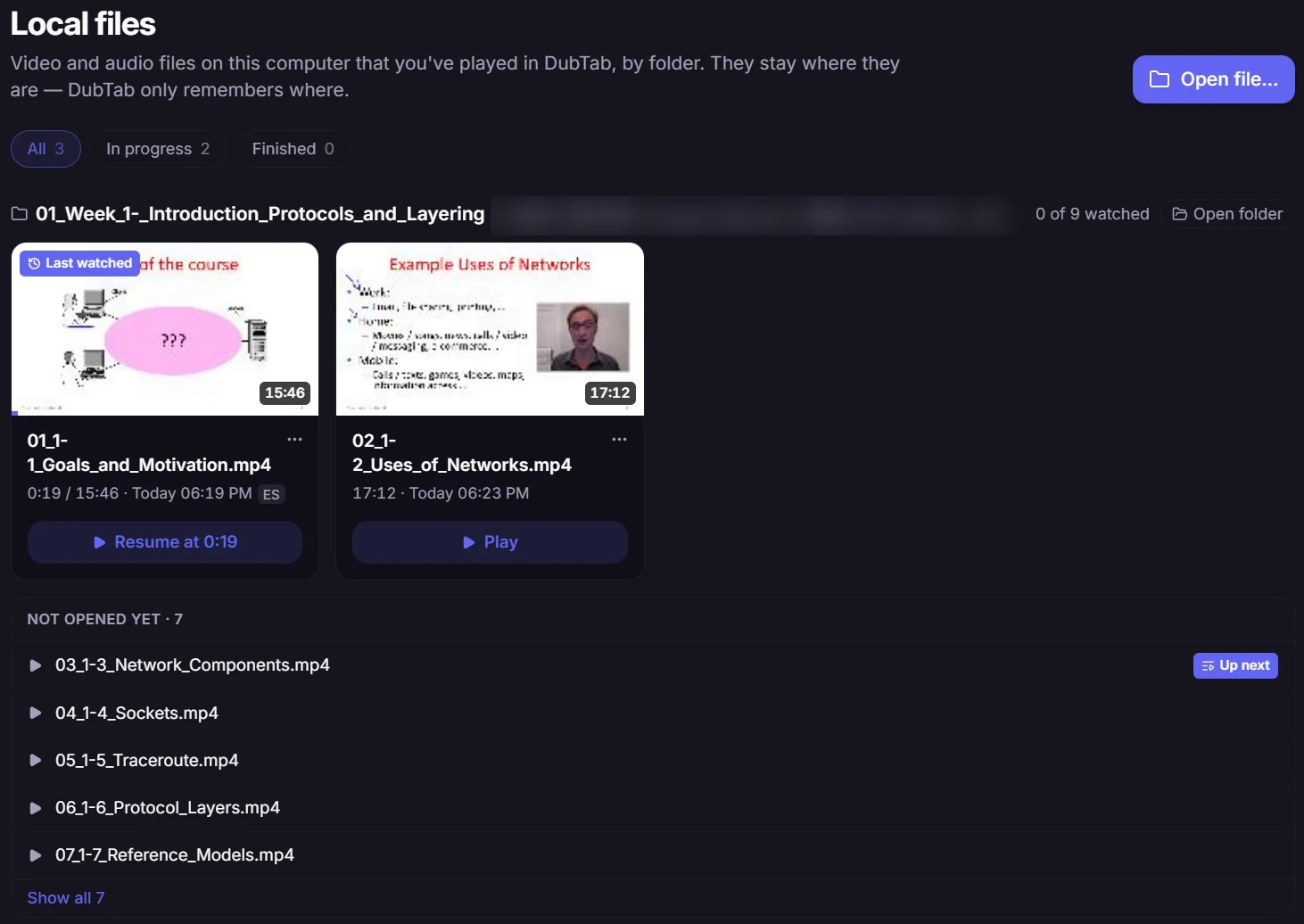
A Local files page. Every file you've played is listed by folder, with how far you got. Resume from its card, or from Continue watching on Home. Remove a file from the list whenever you like — open it again and it comes back with your progress.
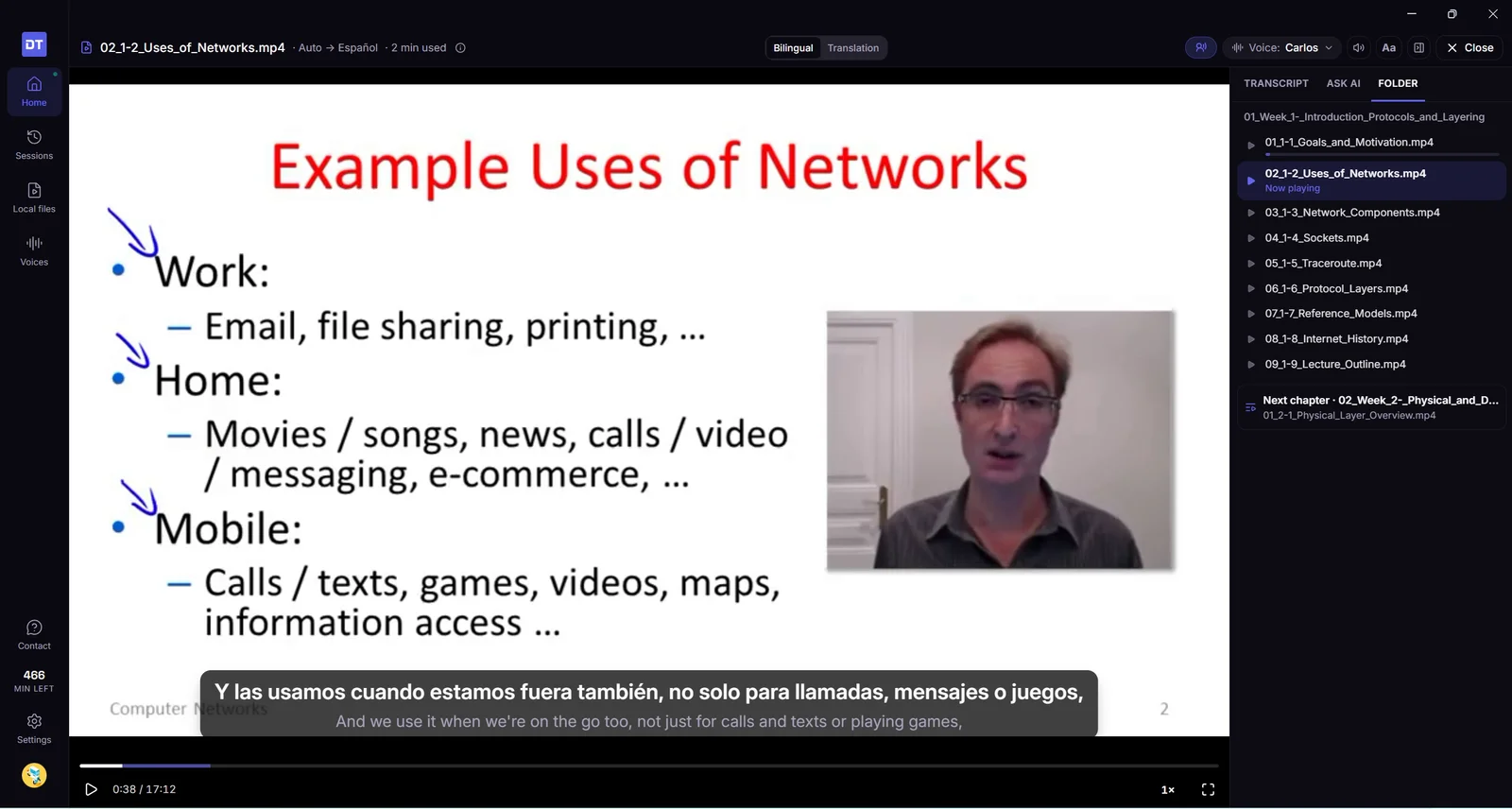
Courses, one lecture after another. Drop a whole course folder and DubTab opens the lecture you were on, or the next one you haven't seen. When a lecture ends, it offers the next file in the folder — and after the last one, the first lecture of the next chapter folder.
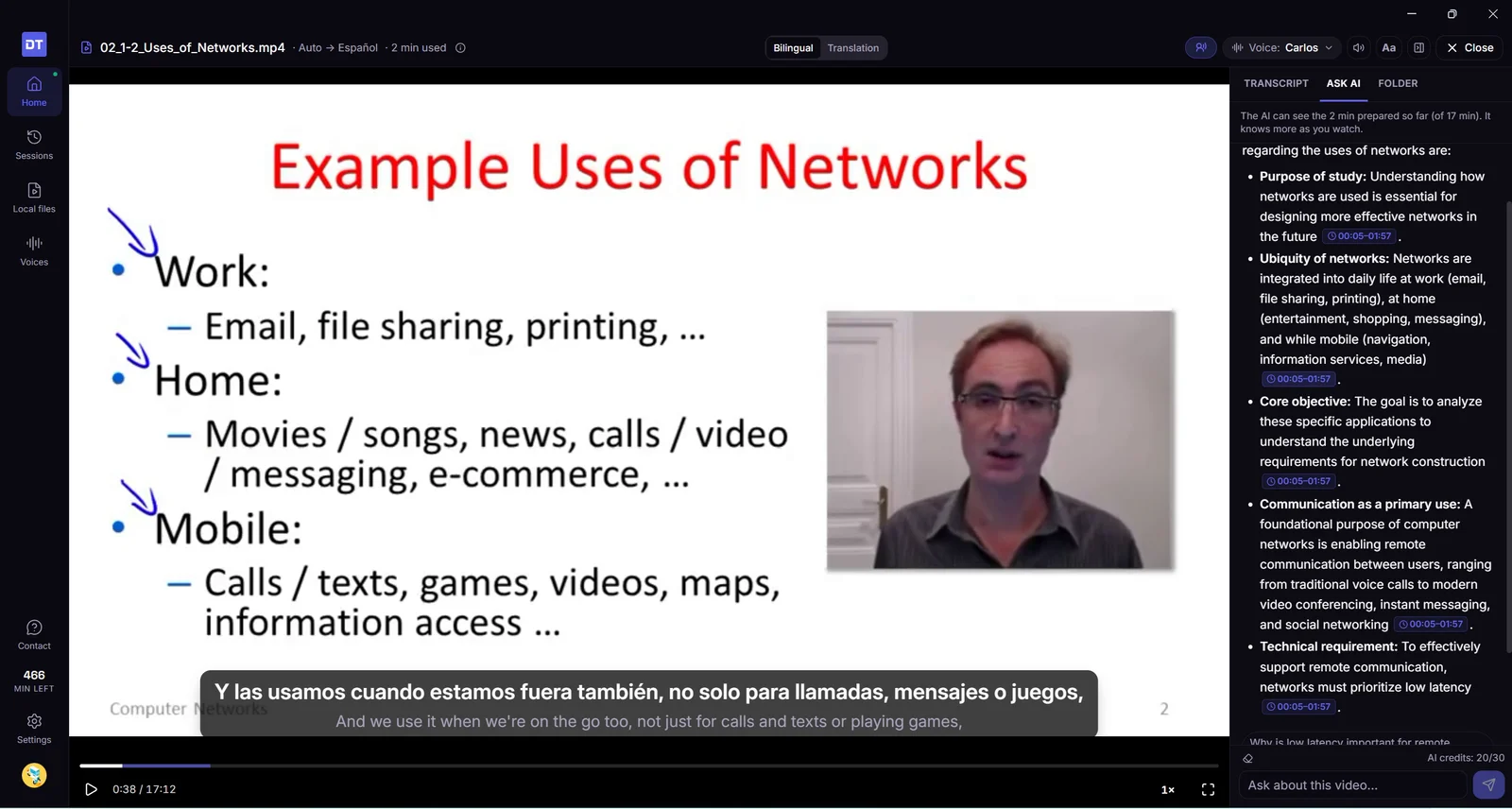
Ask AI about the video. Ask AI sits beside the player. Its answers point to the moment they come from — click one to jump there. You can also start a question from any line in the transcript.
Watch at 0.75×, 1.25× or 1.5×. The dubbing speeds up or slows down with the video and keeps its normal pitch.
Captions where you want them. Drag the captions anywhere on the picture, and double-click to put them back. A long sentence shows in two short parts instead of one tall block over the picture.
Videos that mix languages. DubTab works out the spoken language line by line, so a video that switches language still gets dubbed. If a video is already in your language, DubTab notices, stops preparing so you aren't charged for it, and lets you carry on if the language changes later.
It pauses when you leave. Lock the screen or let the computer sleep and the video pauses. Leave it playing in the background for an hour and it pauses and goes back to where you stopped watching — that part is already prepared, so it costs nothing. The hour only counts while DubTab is in the background, so a film you're watching fullscreen isn't interrupted.
Search every transcript. Type in the search box on Sessions to find a line in any of your sessions, live or video file. For a video file, Play from here reopens it at that line.
Good to know
Formats. DubTab plays MP4, MOV, MKV and WebM with AAC, MP3, Opus or FLAC sound, plus audio files such as MP3. If a file won't open — an AVI, say, or a film with Dolby Digital or DTS sound — play it in your own player and choose One specific app as the source.
How minutes are counted. You pay for the part of the video that gets prepared: at most about 2½ minutes ahead of where you are, and nothing while it's paused. You pay for each part once: watching it again on the same computer, in the same language, is free. Watching in another language prepares it again.
The video stays on your computer. DubTab doesn't copy or upload the file. It sends the sound of the part it's preparing to be transcribed and translated, so preparing needs an internet connection. The transcript and the file's name go into your history like any other session. Subtitles and dubbing are kept on your computer, up to 2 GB. Past that, the oldest videos are cleared first, and watching one of those again is charged again. You can see and clear them in Settings → Prepared videos.
One session per video. However many times you watch a file, it keeps a single session in Sessions, so its whole transcript stays in one place.
Open the desktop app on Windows 10 and it tells you it needs Windows 11, then offers the browser extension. A new install puts the translated line above the original.
desktop Windows captions
Improved
Windows 10 gets a message. Open the desktop app there and it says it needs Windows 11. The button is Get the browser extension, which works on that computer.
A new install puts the translated line above the original. If you already put the original on top, yours stays that way.
The floating captions now fit the line you're hearing, the Mac window behaves in fullscreen, and sessions are less likely to start silent or sound wrong.
desktop macOS captions
Improved
Cinema captions fit the line. The card grows for a long sentence and tightens for a short one, instead of leaving a big empty box. Font size is still in the style panel; the old corner grips are gone.
Captions stay with a fullscreen video on Mac. Open YouTube fullscreen in Safari or Chrome and the Cinema window follows that Space. You can drag it. Clicking it does not yank you back to DubTab.
Pin stays with fullscreen too. If the main window is pinned, it can sit on the same fullscreen video. Covering DubTab with another window no longer hides it or flips you into Cinema by itself.
A smaller main window still works. Squeeze it and the side nav tucks away, Sessions becomes a list you can open, and buttons don't fall off the screen.
The Mac Dock icon fills the tile. It no longer sits in a smaller circle with an empty ring around it.
Resize the window from the edges. The background stays the same color while you drag, instead of flashing white.
Listening is more reliable. On some computers — Bluetooth headphones, unusual speakers — captions used to run too fast, too slow, or not at all. That is much less common now.
Dubbing sounds cleaner. Translated speech has less of that thin, hissy edge on S and T sounds.
Updates you already downloaded actually install. If 1.0.3 sat in the background and never applied, opening the app again should finish the job. You should not get a surprise window just because an update landed.
Fixed
Copy and paste in the sign-in window and Ask AI on Mac. Cmd+V and Cmd+A work there again.
Quit asks first if you are still recording. Cmd+Q no longer drops a session on the floor with no warning.
If you already subscribe, the popup shows your plan. Click it to switch plans or manage billing.
billing captions
Improved
Your plan is in the popup. If you pay for DubTab, the old Upgrade button is now the name of your plan — Starter, Pro, and so on. Click it to switch plans, add hours, or manage billing: card, invoices, cancel.
Listening stays with the video. Captions and the translated voice keep time with what you are watching, including on a computer that uses Bluetooth headphones.
Dubbing can quiet the video. It cannot make it louder. While DubTab is speaking, the video only goes down from the volume you already set.
The desktop app runs on Mac now, so it can translate anything your computer plays — not just what's in a browser tab. Plus fixes for sessions that used to start with nothing on screen.
desktop macOS captions
New
DubTab for Mac. The desktop app runs on Mac now. It hears anything your computer plays — a meeting app, a course you downloaded, a video player — not only what's in a browser tab. Free to install, and it uses the same account and the same hours as the extension, so nothing is spent twice.
You pick what it listens to. Your whole computer, or one app on its own. Picking one app is the difference between translating the speaker and translating the speaker plus your music.
It asks for one thing, once. The first time you start a session, macOS asks whether DubTab may record system audio. That is the only permission it ever asks for — never screen recording, and never your microphone.
Improved
Scroll back to a line you missed. The desktop app now keeps the whole session's captions, so you can go back to something from ten minutes ago without stopping.
Signing in no longer dead-ends. If the browser never hands you back to the app, you now get a way to finish instead of a stuck screen.
Arabic, Hebrew, Persian and Urdu captions read right to left.
Fixed
Start does something now. It used to be possible to press Start and get nothing at all — no session, no error. Now it either starts, or tells you what went wrong.
The controls and captions arrive with the audio. On some pages the dubbing would begin while the on-page controls and subtitles never showed up.
Captions stay on screen in fullscreen. They no longer disappear when a player goes fullscreen.
The desktop app is out. DubTab can now hear anything your computer plays — every app at once, or one app on its own — and caption, translate, and dub it live.
desktop Windows system audio
New
DubTab for Windows. The extension has always covered what plays in your browser. The desktop app covers everything else — desktop video players, meeting clients, downloaded course files, native apps that never open in a tab. It's free to install and uses the same account and the same hours, so nothing is spent twice.
Everything on this computer. Point DubTab at your whole machine and it follows the sound wherever it comes from — a browser tab, a streaming app, a video player, a call — with nothing to set up per app.
One specific app. Or pick a single app and DubTab listens to that alone, so notifications, background music, and everything else stay out of your captions.
Live captions and dubbing, wherever you're watching. A floating caption window stays above whatever is playing, so subtitles work on apps that never had them. Keep it pinned, or step it aside and leave just the latest line on screen.
Dubbing that doesn't talk over the original. While a translated line plays, DubTab lowers the captured app's volume, then brings it back — no manual balancing between the two.
Controls that don't need the window. Start and stop with a system-wide shortcut, keep DubTab in the tray, launch it at login, and pick up where you left off when your computer wakes from sleep.
Everything from the extension came with it. History, collections, search, AI Summary, mind maps, saved dubbing, and your favorite voices are all in the app, on the same cloud account — start a session on either side and it lands in the same history.
Good to know
Windows 11 only. The app relies on an audio feature Windows 10 doesn't have, so there's no way around it. The extension still works everywhere.
No microphone, ever. DubTab can't use your microphone at all. It only hears what your computer is playing, never you.
Save DubTab's translated voice for replay in History, and get an interactive mind map together with every new AI summary for the same single credit.
dubbing history mind maps AI
New
Save dubbed audio. Turn on auto-save before a session to keep the translated voice DubTab generates, then replay it from History after the session ends. This saves only DubTab's generated voice — never the page's original audio, your microphone, or system sound.
Playback that stays with your transcript. The transcript follows the dubbed audio as it plays, and you can click a caption to jump straight to that line. A full timeline, playback-speed controls, and the option to delete the audio without deleting the transcript make reviewing a session easier.
AI Summary and Mind Map for one credit. Generating an AI Summary now creates an interactive mind map at the same time, while still using just 1 AI credit in total.
Explore sessions from the map. Open a timestamped branch to see the matching transcript, play that part of the saved dubbing, continue with Ask AI, or return to the same moment in the source video when available.
Export your mind map. Download it as PNG, SVG, XMind, or OPML, or copy the outline as Markdown.
Improved
A more flexible History workspace. Drag to resize the session list and Ask AI panel, giving the transcript, summary, or mind map as much room as you need.
Better links between Ask AI and the transcript. Time references in answers can now take you directly to the supporting section of the transcript.
Release notes are easier to find. Click the version number in the popup or History sidebar to open the changelog.
Your history now lives in the cloud with collections and search, sessions can be truly paused without being billed, and AI can summarize or answer questions about any session.
history AI voices sessions
New
True pause and resume. Pause now actually pauses your session instead of ending it — audio stops streaming and billing stops while paused. A separate Stop button ends the session when you're done.
Auto-pause. If no captions appear for 5 minutes (configurable to 3, 5, or 10), DubTab shows a 15-second countdown and pauses automatically, so an idle tab never eats into your minutes.
Cloud history. Your session history is now stored in the cloud and available wherever you sign in. Existing records on this device are migrated automatically, with retries if a sync doesn't go through the first time.
History, organized. Group sessions into collections and arrange them by drag and drop. Search across sessions, filter captions within a session, star individual lines, and browse long histories with pagination. TXT export now comes with more formatting options.
AI Summary and Ask AI. Generate a summary of any session, or ask questions about what was said in it. Both use your shared AI credits.
Session recap. When a session ends, you'll see a recap with total duration, paused time, what was actually charged, and your remaining balance — with shortcuts to view the transcript or generate a summary.
Voices page. A dedicated page for browsing voices: search, preview, filter by gender and accent, favorite the ones you like, see recently used voices, and set a default voice per target language.
Settings and account in one place. The History page now includes Settings and Account sections where you can change the interface language, configure auto-pause and auto catch-up, and check your balance, AI credits, 30-day usage, and subscription.
Improved
Searchable language picker. Language selection is now a searchable list instead of a plain dropdown, so finding your language takes a keystroke instead of a scroll.
The translated voice keeps pace with the video while still reading every line, and connection status now comes with a plain explanation.
voice reliability
New
Auto catch-up. When the translated voice falls behind the speaker, DubTab speeds it up just enough to catch back up, while still reading every line in full.
Improved
Clearer connection status. Timeouts, connection failures and expired sign-ins now come with a plain explanation and a suggested next step. During reconnection you can see the current attempt and stop it at any time.
Listen with nothing on screen, fold the Caption Panel away, and see a clear explanation whenever captions stop.
caption panel voice layout
Two small comforts: less on screen, and more clarity about what DubTab is doing.
New
Audio Only. Hear the translated voice with nothing on screen at all — ideal for lectures and podcasts you follow while doing something else.
Collapse and expand. Fold the Caption Panel down to a slim bar with one click, and bring it back the same way.
Improved
Clear stop messages. When captions stop, DubTab explains why — the tab moved to another page, the tab was closed or replaced, or no audio was detected for a while — along with how to start again.
A clearer waiting state. While waiting for audio, DubTab reminds you to check that the video is playing and not muted.
Resize from the corner. A tooltip points out that you can drag the corner of the panel to resize it.
If the voice you picked isn't available, DubTab switches to the closest match and tells you which one it chose.
voice feedback
Improved
Voice availability notices. If your chosen voice isn't available for the language you're watching in, DubTab switches to the closest match and names the one it picked, so playback carries on smoothly.
A tidier feedback panel. The panel for getting in touch was rebuilt to be simpler and easier to scan.
Keyboard-friendly logo. The DubTab logo takes you to the homepage, and now responds to the keyboard as well as the mouse.
Join the DubTab community straight from the extension, get guidance on when to pick the source language yourself, plus a set of fixes across captions and audio.
community voice captions
New
Discord community. There's now a link to our Discord right in the feedback panel — ask questions, report problems, and suggest features without leaving what you're watching.
Source language tips. The popup now tells you when picking the source language yourself pays off: choose it for single-language audio to improve accuracy, and stick with Auto Detect when several languages are mixed.
Fixed
Volume changes to the original audio now take effect while Audio Ducking is on.
Subtitles in Panel and Cinema modes now stay within the video area.
The voice list now shows a single set of options when reopened.
Text highlighting now follows the translated voice.