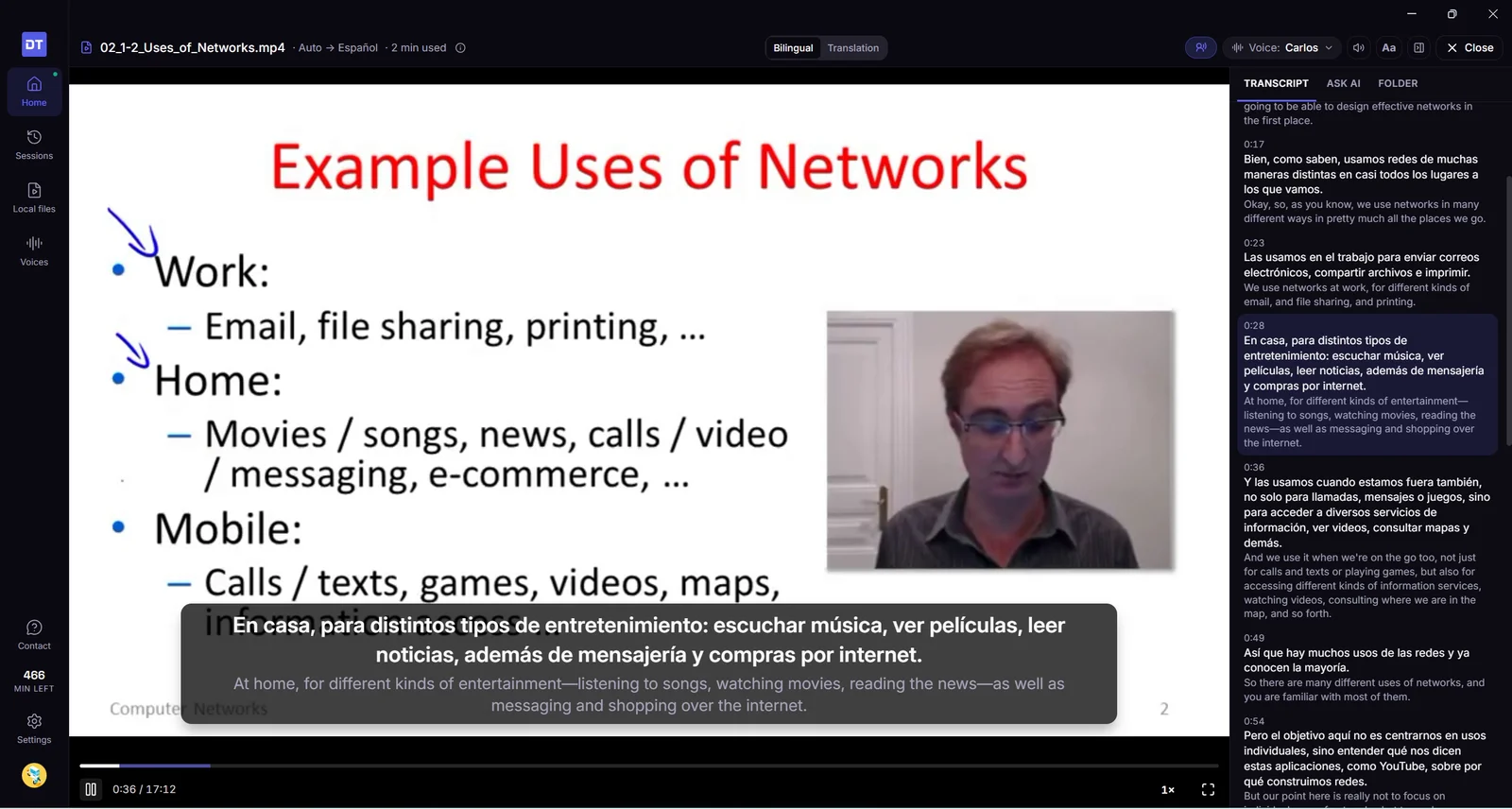
Przy wyłączonym dubbingu napisy w trybie kinowym przewijają się teraz jak napisy na żywo w telewizji, mają szerokość, którą wybierasz, i na każdej stronie zostają tam, gdzie je ustawisz. Dochodzi chorwacki, a DubTab mówi teraz, dlaczego, gdy logowanie się nie uda albo sieć ciągle blokuje dźwięk.
napisy języki niezawodność
Nowości
Chorwacki. Tłumacz z chorwackiego lub na chorwacki, korzystając z chorwackich głosów do dubbingu.
Ustaw szerokość napisów w trybie kinowym. Przy wyłączonym dubbingu wskaż napisy i przeciągnij ich lewą lub prawą krawędź, by je poszerzyć lub zwęzić. Kliknij krawędź dwukrotnie, aby wrócić do domyślnej szerokości. DubTab zapamiętuje twój wybór.
Napisy w trybie kinowym pamiętają, gdzie je ustawisz, na każdej stronie. Odsuń je raz od elementów sterowania odtwarzacza, a następnym razem na tej stronie pojawią się w tym samym miejscu. Kliknij napisy dwukrotnie, aby wróciły na domyślną pozycję.
Ulepszenia
Przy wyłączonym dubbingu napisy w trybie kinowym przewijają się jak w telewizji na żywo. Poprzedni wiersz zostaje na ekranie — przygaszony — nad nowym, a gdy przychodzi kolejny, napisy przesuwają się w górę. Tłumaczenie pojawia się teraz, gdy tylko jest gotowe, zamiast czekać na koniec zdania, a długi wiersz nie znika już w chwili, gdy kończy się następny, więc zdążysz go doczytać.
Napisy stoją w miejscu. Przy wyłączonym dubbingu każdy wiersz zaczyna się przy tej samej krawędzi i ma tę samą szerokość, zamiast wyśrodkowywać się i przeskakiwać w nowe miejsce z każdym wierszem. Wiersz za długi na jeden rząd dzieli się na dwa równe rzędy, a wiersz, który jeszcze rośnie, pokazuje najwyżej dwa rzędy — wcześniejsze przewijają się w górę. Tłumaczenie jest na górze, tuż pod poprzednim wierszem, niezależnie od tego, co ustawiono w Kolejność napisów. Twoje ustawienie nadal obowiązuje przy włączonym dubbingu, gdzie napisy jak dotąd są jednym wyśrodkowanym wierszem.
Przesunięte napisy zostają na miejscu. Dłuższe wiersze rosną teraz w górę od miejsca, w którym zostawiono napisy, zamiast rozlewać się w dół i na boki, a napisy trzymają swoje miejsce, gdy zmieniasz rozmiar okna albo przechodzisz na pełny ekran.
Napisy z obwódką. W trybie kinowym przeciągnij suwak Krycie tła maksymalnie w lewo, a ramka zniknie całkowicie — bez obramowania i cienia. Zamiast niej napisy dostają czarną obwódkę — klasyczny wygląd napisów, czytelny na każdym obrazie.
Jeden Rozmiar tekstu dla napisów, na które patrzysz. W Ustawieniach był osobny suwak rozmiaru czcionki dla każdego trybu i łatwo było przeciągnąć ten, który niczego na ekranie nie zmieniał. Teraz jest jeden Rozmiar tekstu i zmienia to, co akurat widać: panel, gdy wybrano Panel napisów, a napisy, gdy wybrano Tryb kinowy. Każdy tryb pamięta własny rozmiar, a napisy w trybie kinowym mogą teraz być mniejsze.
Tylko dźwięk odtwarza przetłumaczony głos. Wybranie opcji Tylko dźwięk przy wyłączonym przetłumaczonym głosie ukrywało napisy i nic nie odtwarzało. Teraz włącza też głos. Zwiń nadal tylko chowa DubTab.
Spokojniejszy panel napisów. Jego pasek przewijania nie przesuwa się już z każdym nowym wierszem: pojawia się, gdy wracasz do wcześniejszych napisów, i znika, gdy wracasz do najnowszych. Paski przewijania w panelu, w jego ustawieniach i na liście głosów są teraz cienkie, bez białej ścieżki i strzałek.
Lżej dla twojego łącza. DubTab wysyła teraz dźwięk karty, zużywając jedną trzecią danych, co pomaga przy wolnym lub przeciążonym połączeniu.
Mowa bez interpunkcji jest dzielona na czytelne wiersze. Ktoś, kto nigdy nie zatrzymywał się na kropce, tworzył jeden napis rosnący przez kilka minut, bez dubbingu aż do jego końca albo w ogóle bez dubbingu. Teraz taki długi wiersz kończy się przy następnej pauzie, najpóźniej po około 40 sekundach, i dostaje dubbing. Filmy, które już są w języku, na który tłumaczysz, traktowane są tak samo.
Zdania w hindi są teraz rozdzielane przy znaku końca zdania (।), dzięki czemu każde ma osobne napisy i dubbing.
Historia pokazuje, skąd pochodzi sesja z DubTab na komputer. Sesje z aplikacji na komputer mają etykietę Lokalny film, z długością filmu, albo DubTab na komputer, zamiast pokazywać "desktop", jakby to była strona internetowa.
Poprawki
Gdy logowanie się nie uda, DubTab mówi, dlaczego. Wcześniej zatrzymywał się bez słowa. Teraz informuje, gdy przeglądarka nie obsługuje logowania przez Google w rozszerzeniach, i wskazuje Chrome, Edge lub Brave albo aplikację DubTab na Maca lub Windows; gdy przeglądarka nie może połączyć się z Google, przez które DubTab cię loguje; albo po prostu, że logowanie się nie udało i można spróbować ponownie. Przycisk nie kręci się już bez końca, gdy logowanie urwie się w połowie.
Gdy sieć ciągle blokuje dźwięk, DubTab się zatrzymuje i wyjaśnia, co się dzieje. Kiedy coś między tobą a naszym serwerem, na przykład VPN, zapora albo filtr sieciowy, raz po raz zacinało połączenie, DubTab łączył się ponownie bez końca i liczył minuty, choć nie pojawiały się żadne napisy. Teraz zatrzymuje się po trzech nieudanych próbach z rzędu i podpowiada, co możesz zrobić.
Podsumowanie i mapa myśli czekają na sesję, która właśnie się skończyła. Tuż po zatrzymaniu tłumaczenia pokazują Oczekiwanie na synchronizację, aż sesja zapisze się na twoim koncie, a potem same się przełączają, bez przeładowywania Historii. Prośba o podsumowanie tak wcześnie kończyła się błędem.
Przy wyłączonym dubbingu napisy w trybie Kino przewijają się teraz jak napisy na żywo w telewizji: poprzedni wiersz zostaje nad nowym, a wszystkie wiersze mają tę samą szerokość i ten sam punkt początkowy — szerokość, którą możesz teraz zwiększyć lub zmniejszyć, przeciągając. Tłumaczenie jednej aplikacji działa też dalej, gdy ta aplikacja uruchomi się ponownie.
komputer napisy
Nowości
Ustaw szerokość napisów. Gdy Dubbing jest wyłączony, wskaż lewą lub prawą krawędź napisów w trybie Kino i przeciągnij ją, by poszerzyć lub zwęzić napisy. Kliknij krawędź dwukrotnie, aby wrócić do domyślnej szerokości. DubTab zapamiętuje twój wybór.
Ulepszenia
Przy wyłączonym Dubbingu napisy w trybie Kino przewijają się jak w telewizji na żywo. Poprzedni wiersz zostaje na ekranie — przygaszony — nad nowym, a gdy przychodzi kolejny, napisy przesuwają się w górę. Długie wiersze nie znikają już chwilę po pojawieniu się, więc zdążysz je doczytać.
Napisy stoją w miejscu. Każdy wiersz zaczyna się przy tej samej krawędzi i ma tę samą szerokość, zamiast wyśrodkowywać się i przeskakiwać w nowe miejsce z każdym wierszem. Wiersz za długi na jeden rząd dzieli się na dwa równe rzędy, a wiersz, który jeszcze rośnie, pokazuje najwyżej dwa rzędy — wcześniejsze przewijają się w górę.
Przy wyłączonym Dubbingu tłumaczenie jest na górze — tuż pod poprzednim wierszem, niezależnie od tego, co ustawiono w Kolejność wierszy w menu Wygląd napisów (przycisk A). Twoje ustawienie nadal obowiązuje przy włączonym dubbingu, gdzie napisy jak dotąd są jednym wyśrodkowanym wierszem.
Lista aplikacji otwiera się od razu. Kliknięcie Zmień na ekranie Start, by wybrać Jedna wybrana aplikacja, za każdym razem otwierało pustą listę. Teraz od razu pojawia się ostatnia lista i odświeża się w tle: jest gotowa już za pierwszym razem, a pierwsze ładowanie po otwarciu DubTab jest szybsze. Odśwież listę aplikacji pokazuje znaczek potwierdzenia po zakończeniu, a lista odświeża się automatycznie, gdy wracasz do DubTab.
Przycisk startu pomaga, gdy nie wybrano aplikacji. Gdy zaznaczona jest opcja Jedna wybrana aplikacja, ale nie wskazano aplikacji, przycisk pokazuje Wybierz aplikację… i otwiera listę, zamiast kończyć się błędem z komunikatem o logowaniu.
Poprawki
Jedna wybrana aplikacja jest słuchana dalej, gdy uruchomi się ponownie. Jeśli wybrana aplikacja uruchomiła się ponownie — na przykład przeglądarka po aktualizacji — DubTab teraz znajduje ją znowu. Wcześniej w Windows mogła ruszyć sesja, która nic nie słyszała, a mimo to liczyła minuty, aż wstrzymała się automatycznie. Jeśli aplikacja została zamknięta, DubTab mówi o tym przy uruchamianiu, żeby można było ją otworzyć albo wybrać inną.
Na Macu ekran Start nie pokazuje już Oczekiwanie na dźwięk…, gdy coś gra. Dopóki po otwarciu DubTab nie uruchomisz tłumaczenia po raz pierwszy, Mac nie słucha (dzięki temu nigdy nie prosi samoczynnie o dostęp do dźwięku). Karty do tego czasu nie pokazują wskaźnika dźwięku, zamiast sugerować, że DubTab nic nie słyszy.
Ukryj pasek narzędzi w trybie Kino, by na ekranie zostały same napisy, a sterowanie otwieraj, klikając je prawym przyciskiem myszy. Usuń tło napisów całkowicie, a dostaniesz napisy z obwódką. Znów możesz też tłumaczyć dźwięk jednej aplikacji.
komputer napisy
Nowości
Same napisy, jeśli wolisz. Włącz opcję Ukrywaj pasek narzędzi w trybie Kino w sekcji Ustawienia, a tryb Kino pokaże wyłącznie napisy: przyciski nad nimi przestaną się pojawiać, nawet podczas wstrzymania. Przydaje się, gdy udostępniasz lub nagrywasz ekran.
Kliknij napisy prawym przyciskiem myszy w trybie Kino, aby otworzyć sterowanie: Wstrzymaj lub Wznów, Zatrzymaj i zapisz w Sesjach, Ukryj pasek narzędzi lub Pokaż pasek narzędzi oraz Otwórz aplikację — obok widać skróty klawiszowe.
Napisy z obwódką. Przeciągnij suwak Krycie tła (w menu Aa) maksymalnie w lewo, a ramka zniknie. Przy lewym końcu suwaka napisy dostają czarną obwódkę — klasyczny wygląd napisów, czytelny na każdym obrazie.
Znów możesz wybrać jedną aplikację. Kliknij Zmień na ekranie Start i wybierz Jedna wybrana aplikacja, by tłumaczyć dźwięk tylko z tej aplikacji: powiadomienia, muzyka czy rozmowa grające w tym samym czasie nie trafią do napisów.
Ulepszenia
Na Macu wskaźnik pokazuje, co możesz zrobić w trybie Kino: dłoń tam, gdzie da się przeciągnąć napisy, i wskazujący palec nad przyciskami.
Przycisk zatrzymania mówi, co robi: Zatrzymaj i zapisz w Sesjach.
Poprawki
Napisy w trybie Kino są czytelne w jasnym motywie. Wcześniej białe napisy wyświetlały się na białej ramce; teraz ich tło jest ciemne w obu motywach.
W trybie Kino tłumaczenie pozostaje na ekranie, aż kolejne będzie gotowe. Napisy możesz przeciągać, chwytając je w dowolnym miejscu, tak jak w rozszerzeniu przeglądarki. Dodaliśmy chorwacki oraz poprawki znikających tłumaczeń, niekończących się napisów i obsługi plików wideo.
komputer napisy języki pliki lokalne
Nowości
Chorwacki. Tłumacz z chorwackiego lub na chorwacki, korzystając z chorwackich głosów do dubbingu.
Ulepszenia
Napisy w trybie Kino pozostają na ekranie wystarczająco długo, by je przeczytać. Tłumaczenie jest widoczne, aż gotowe będzie tłumaczenie następnego zdania. Nie zastępuje go już oryginalny tekst kolejnego zdania w chwili, gdy rozmówca zaczyna mówić dalej. Tryb Kino wyświetla teraz napisy tak samo jak rozszerzenie przeglądarki.
Przesuwaj napisy, chwytając je w dowolnym miejscu, tak jak w rozszerzeniu przeglądarki. Przeciąganie elementów sterowania nad nimi również przesuwa napisy. Przeciągnięcie przycisku Wstrzymaj nie wstrzymuje już przypadkowo tłumaczenia.
Elementy sterowania mniej przeszkadzają w oglądaniu. Pojawiają się po najechaniu na napisy, a nie za każdym razem, gdy wskaźnik przechodzi przez obraz. Podczas pauzy na ekranie pozostaje tylko Wznów. W Windows kliknięcia obok napisów docierają teraz do filmu pod spodem.
Koniec migotania w Windows, gdy następny napis ma inny rozmiar.
Poprawki
Tłumaczenia już nie znikają. Po krótkiej przerwie w mowie część tłumaczenia mogła zniknąć zarówno z napisów, jak i z sesji.
Mowa bez przerw jest dzielona na czytelne linie, zamiast tworzyć jeden coraz dłuższy napis, którego w końcu nie dało się już zdubbingować.
Zdania w hindi są teraz rozdzielane przy znaku końca zdania (।), dzięki czemu każde ma osobne napisy i dubbing.
Pliki wideo: fragment, którego nie udało się zdubbingować, nie każe już czekać. DubTab wyświetla Nie udało się zdubbingować tego fragmentu — oryginalny dźwięk i odtwarza dalej.
Pliki wideo: otwarcie innego pliku, gdy następny wciąż się ładuje, nie przełącza już na niewłaściwy film.
Zamknięcie systemu Windows lub wylogowanie się z Windows podczas sesji nie powoduje już utraty ostatnich linijek.
Przy pierwszym uruchomieniu DubTab ekran Start pokazuje dwa sposoby korzystania z aplikacji. Gdy przeskoczysz dalej w pliku wideo, film poczeka na dubbing zamiast grać dalej z oryginalnym dźwiękiem. Przejście do następnej lekcji nie prowadzi już przez ekran Start.
komputer pliki lokalne kursy
Ulepszenia
Czytelniejszy początek. Przy pierwszym uruchomieniu DubTab ekran Start wyjaśnia jego działanie — Tłumacz i dubbinguj wszystko, co gra na twoim komputerze — i pokazuje dwie opcje: Wszystko, co gra na komputerze, z dubbingiem podczas odtwarzania, albo Plik wideo na tym komputerze, przygotowywany z niewielkim wyprzedzeniem, aby głos nadążał za obrazem. Wybierz opcję i naciśnij Rozpocznij tłumaczenie.
Przeskocz dalej, a DubTab poczeka na dubbing. Jeśli przejdziesz do nieprzygotowanej jeszcze części pliku wideo, film zatrzyma się z komunikatem Przygotowywanie dubbingu…. Gdy fragment będzie gotowy, odtwarzanie ruszy z przetłumaczonym głosem. Nie chcesz czekać? Wybierz Odtwórz teraz z oryginalnym dźwiękiem. Przygotowane fragmenty odtwarzają się od razu, tak jak wcześniej.
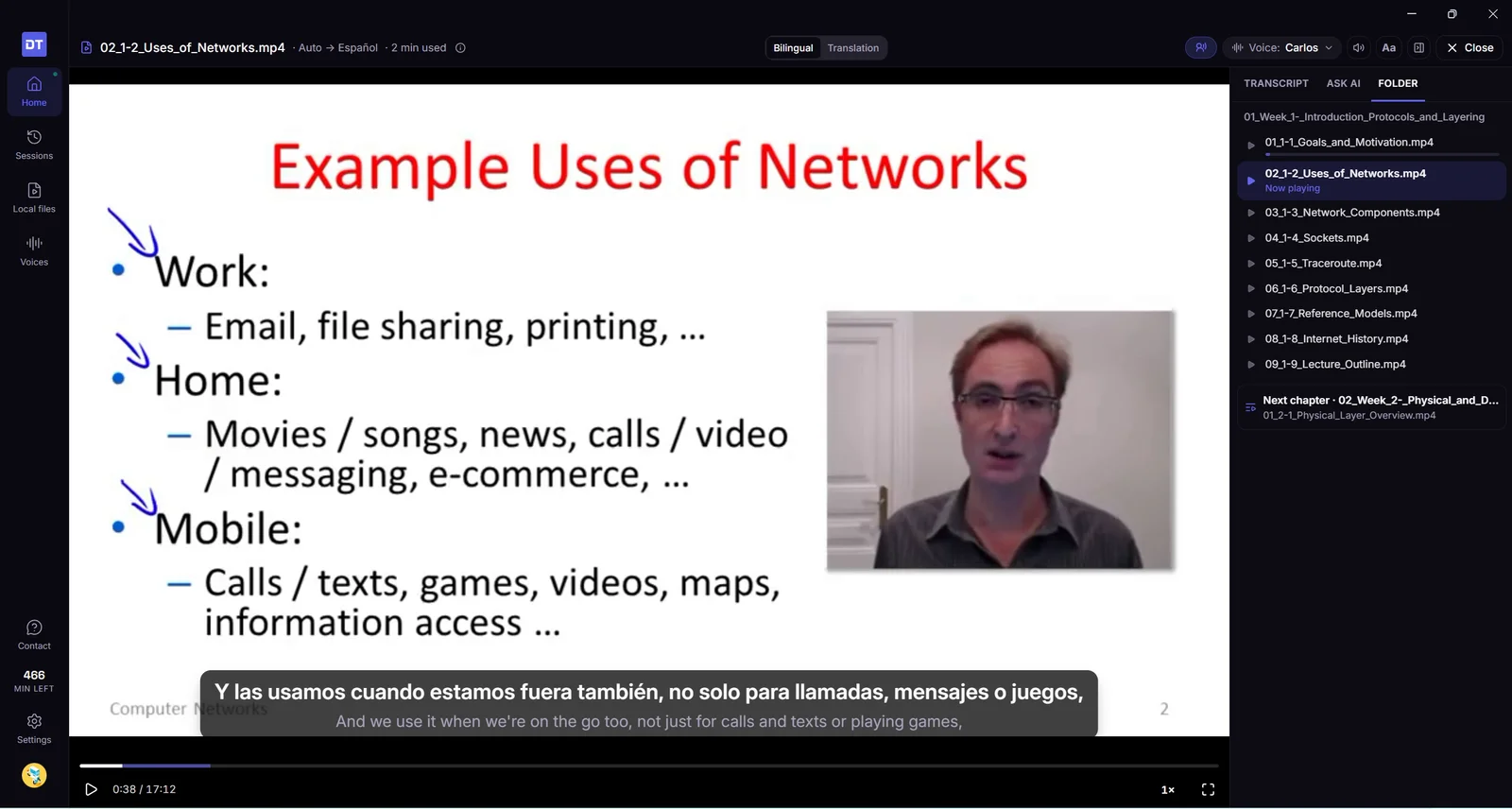
Następna lekcja zaczyna się bez zbędnych przejść. Wybierz inny film z karty Folder, przez Następny, następny rozdział, Pliki lokalne, Oglądaj dalej lub Sesje — obecny film pozostanie na ekranie, dopóki nowy nie będzie gotowy. Ekran Start nie pojawi się już na moment pomiędzy nimi. Jeśli nowego pliku nie da się znaleźć, na przykład po odłączeniu dysku, obecny film po prostu będzie odtwarzany dalej.
Karta Folder pozostaje otwarta przy przejściu do następnej lekcji, więc lista kursu nadal jest widoczna obok odtwarzacza.
Poprawki
Film otwarty w tle nie łączy się już bez przerwy na nowo. DubTab utrzymuje połączenie tylko podczas przygotowywania filmu i zamyka je, gdy nie ma już nic do przygotowania.
Minuty wyświetlane przy zamykaniu filmu są teraz poprawnie zliczane. Obejmują całe zużycie podczas danego oglądania, a nie tylko ostatni odcinek.
Warto wiedzieć
Pliki, których DubTab nie może otworzyć. Odtwórz je we własnym odtwarzaczu i wybierz Dźwięk z komputera — komunikat udostępnia teraz tę opcję bezpośrednio.
Otwórz plik wideo albo audio z komputera, a DubTab zrobi do niego napisy i dubbing we własnym odtwarzaczu, przygotowując je z lekkim wyprzedzeniem, żeby głos nadążał za obrazem. To, co już przygotowane, zostaje na twoim komputerze, więc ponowne oglądanie jest darmowe. Kurs rusza od miejsca, w którym go przerwano, „Zapytaj AI” odpowiada na pytania o film, a wszystkie swoje transkrypcje możesz przeszukać.
komputer pliki lokalne kursy AI historia
Nowości
Odtwórz plik wideo i słuchaj go w swoim języku. Otwórz albo przeciągnij wykład, film czy nagranie — MP4, MKV, MOV, WebM, MP3 i inne — a DubTab zrobi napisy, tłumaczenie i dubbing we własnym odtwarzaczu. Dubbing jest przygotowywany z lekkim wyprzedzeniem względem miejsca, w którym jesteś, więc głos nadąża za obrazem. Pierwsze kwestie wymagają chwili; jeśli nie chcesz czekać, kliknij Odtwórz teraz z oryginalnym dźwiękiem.
Oglądaj ponownie za darmo. Napisy i dubbing zapisują się na komputerze w miarę przygotowywania. Wszystko, co już przygotowane, odtwarza się ponownie bez zużywania minut — i pozostaje darmowe, nawet jeśli zmienisz głos na inny.
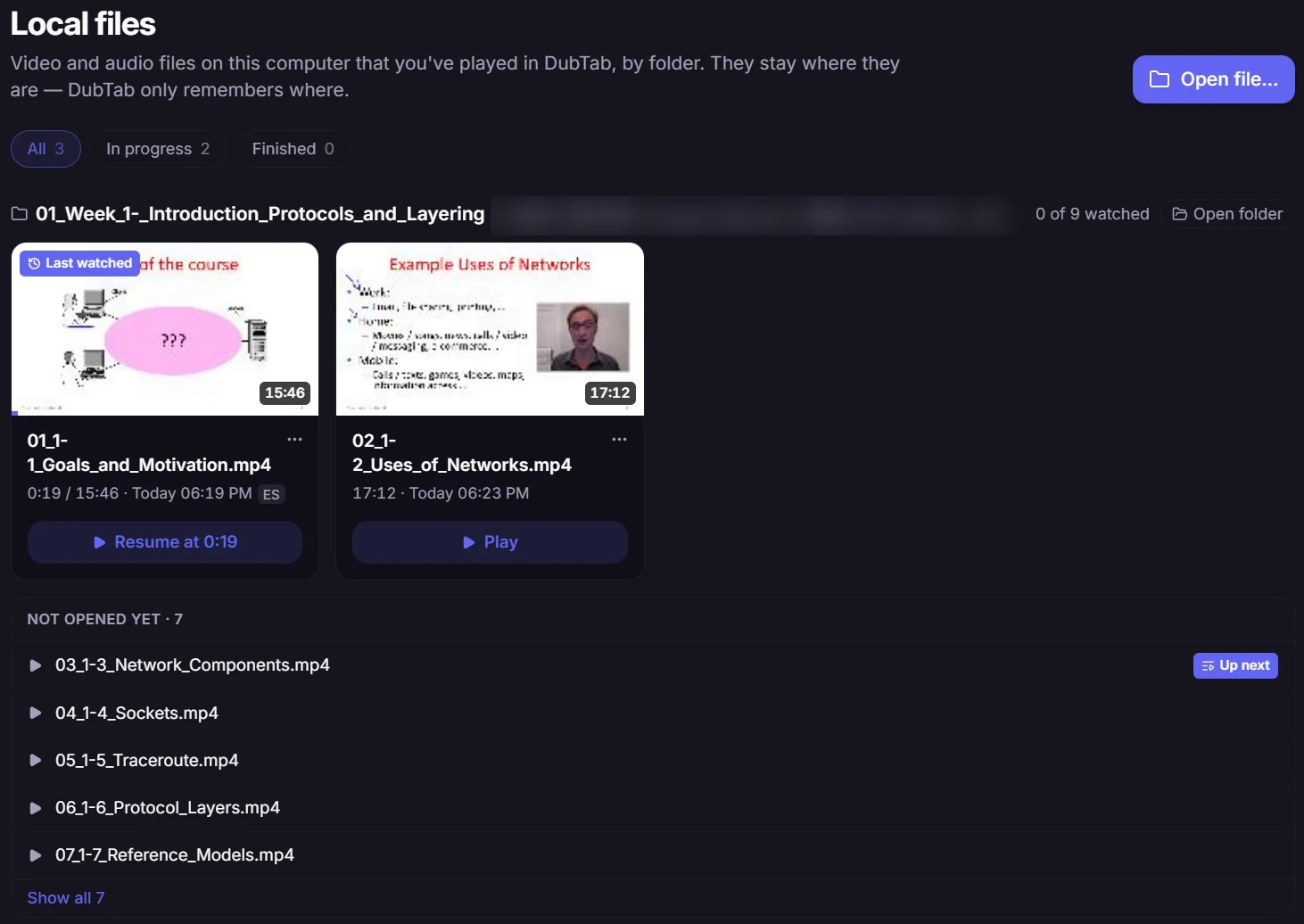
Strona Pliki lokalne. Każdy odtworzony plik widać na liście pogrupowanej według folderów, razem z tym, ile już obejrzano. Wznów go z jego karty albo z sekcji Oglądaj dalej na stronie Start. Usuń plik z listy, kiedy chcesz — gdy otworzysz go ponownie, wróci razem z postępem.
Kursy, wykład za wykładem. Przeciągnij cały folder kursu, a DubTab otworzy wykład, przy którym jesteś, albo kolejny, jeszcze nieobejrzany. Gdy wykład się kończy, proponuje następny plik z folderu — a po ostatnim pierwszy wykład z folderu następnego rozdziału.
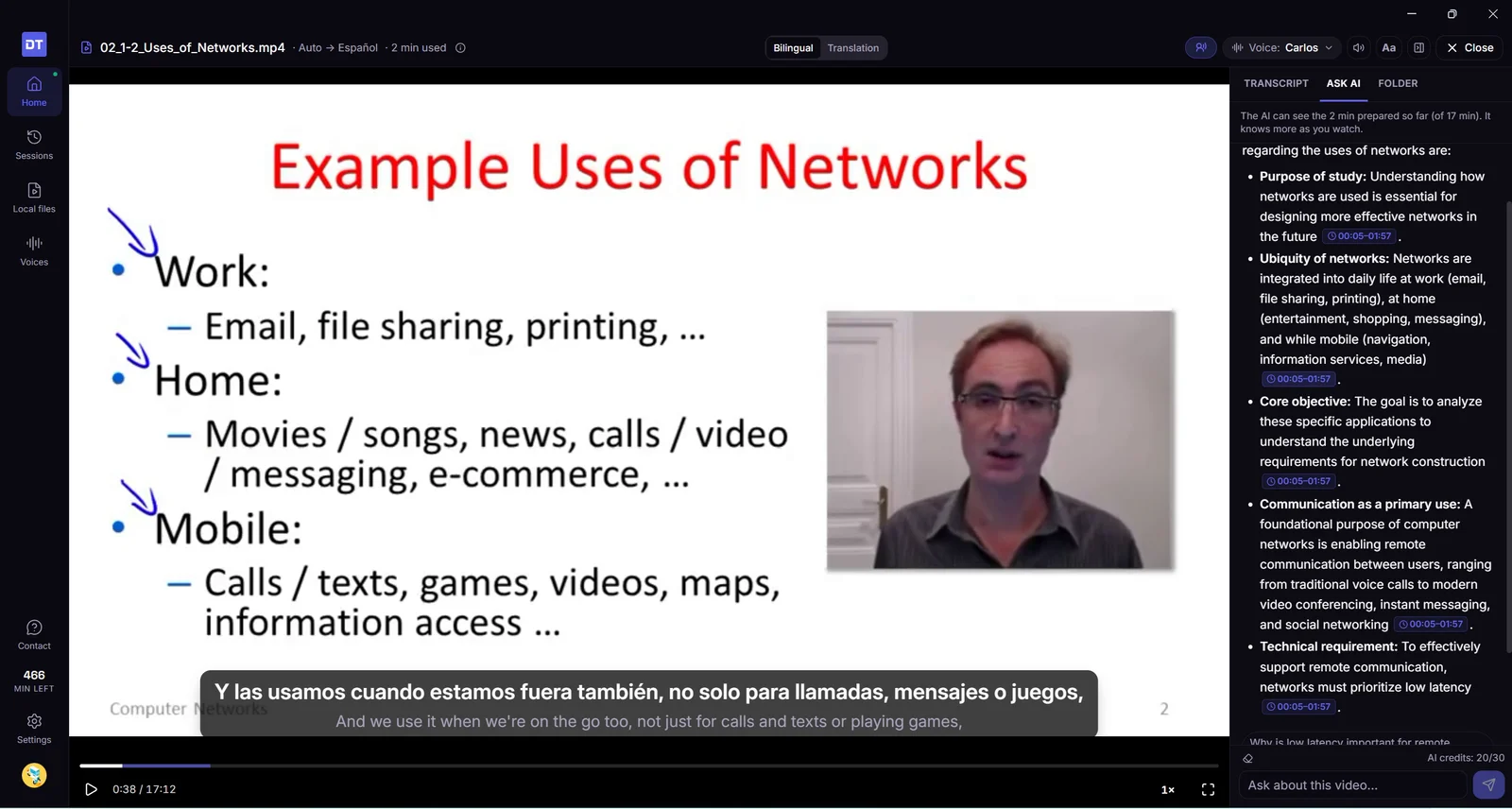
Zapytaj AI o film. Panel „Zapytaj AI” jest obok odtwarzacza. Odpowiedzi wskazują moment, z którego pochodzą — kliknij, żeby tam przeskoczyć. Pytanie możesz też zacząć od dowolnej linijki transkrypcji.
Oglądaj w tempie 0,75×, 1,25× albo 1,5×. Dubbing przyspiesza albo zwalnia razem z filmem i zachowuje normalną wysokość głosu.
Napisy tam, gdzie chcesz. Przeciągnij napisy w dowolne miejsce obrazu, a dwukrotne kliknięcie odstawi je z powrotem. Długie zdanie wyświetla się w dwóch krótkich częściach zamiast jednego wysokiego bloku na obrazie.
Filmy, w których mieszają się języki. DubTab rozpoznaje język mówiony linijka po linijce, więc film, który zmienia język, i tak dostaje dubbing. Jeśli film jest już w twoim języku, DubTab to zauważy, przestanie go przygotowywać, żeby nie naliczać ci za to minut, i pozwoli kontynuować, jeśli język później się zmieni.
Pauza, kiedy odchodzisz. Zablokuj ekran albo uśpij komputer, a film się zatrzyma. Zostaw go grającego w tle na godzinę, a zatrzyma się i wróci do miejsca, na którym skończyło się oglądanie — ten fragment jest już przygotowany, więc nic nie kosztuje. Godzina liczy się tylko wtedy, gdy DubTab jest w tle, więc film oglądany na pełnym ekranie nie zostanie przerwany.
Przeszukuj wszystkie transkrypcje. Wpisz tekst w pole wyszukiwania na stronie Sesje, żeby znaleźć linijkę w dowolnej sesji — na żywo albo z pliku wideo. W przypadku pliku wideo Odtwórz od tego miejsca otwiera go ponownie od tej linijki.
Warto wiedzieć
Formaty. DubTab odtwarza MP4, MOV, MKV i WebM z dźwiękiem AAC, MP3, Opus albo FLAC, a także pliki audio, na przykład MP3. Jeśli plik się nie otwiera — na przykład AVI albo film z dźwiękiem Dolby Digital lub DTS — odtwórz go we własnym odtwarzaczu i wybierz jako źródło Jedna wybrana aplikacja.
Jak liczone są minuty. Płacisz za tę część filmu, która zostanie przygotowana: najwyżej około 2½ minuty przed miejscem, w którym jesteś, i nic, gdy film jest wstrzymany. Za każdą część płacisz raz: ponowne oglądanie na tym samym komputerze, w tym samym języku, jest darmowe. Oglądanie w innym języku przygotowuje film od nowa.
Wideo zostaje na twoim komputerze. DubTab nie kopiuje pliku ani nie przesyła go na serwer. Do transkrypcji i tłumaczenia wysyła dźwięk fragmentu, który właśnie przygotowuje, więc przygotowanie wymaga połączenia z internetem. Transkrypcja i nazwa pliku trafiają do historii jak każda inna sesja. Napisy i dubbing są przechowywane na komputerze, do 2 GB. Powyżej tego limitu najpierw usuwane są najstarsze filmy, a ponowne obejrzenie któregoś z nich jest znowu płatne. Możesz je przejrzeć i wyczyścić w sekcji Ustawienia → Przygotowane wideo.
Jedna sesja na film. Niezależnie od tego, ile razy obejrzysz plik, ma on jedną sesję na stronie Sesje, więc cała jego transkrypcja jest w jednym miejscu.
Otwórz aplikację na komputer w Windows 10, a napisze, że potrzebuje Windows 11, i poda rozszerzenie do przeglądarki. Nowa instalacja stawia przetłumaczoną linijkę nad oryginałem.
komputer Windows napisy
Ulepszenia
W Windows 10 pojawia się komunikat. Otwórz tam aplikację na komputer — napisze, że potrzebuje Windows 11. Przycisk to Pobierz rozszerzenie do przeglądarki. Rozszerzenie działa na tym komputerze.
Nowa instalacja stawia przetłumaczoną linijkę nad oryginałem. Jeśli oryginał był już na górze, zostaje tak, jak jest.
Pływające napisy dopasowują się do linii, którą słyszysz, okno na Macu zachowuje się przyzwoicie na pełnym ekranie, a sesje rzadziej startują w ciszy albo z pokręconym dźwiękiem.
komputer macOS napisy
Ulepszenia
Napisy w trybie Kino dopasowują się do linii. Karta rośnie przy długim zdaniu i kurczy się przy krótkim, zamiast zostawiać wielkie puste pudło. Wielkość czcionki nadal ustawiasz w panelu stylu; uchwyty w rogach zniknęły.
Na Macu napisy zostają przy filmie na pełnym ekranie. Otwórz YouTube na pełnym ekranie w Safari albo Chrome, a okno Kina pójdzie za tobą w tę przestrzeń. Możesz je przeciągnąć. Kliknięcie nie ściąga cię z powrotem do DubTaba.
Okno zawsze na wierzchu też idzie za pełnym ekranem. Jeśli główne okno trzymasz na wierzchu, może zostać na tym samym filmie na pełnym ekranie. Prysłonięcie DubTaba innym oknem już go nie chowa i samo nie przerzuca do Kina.
Węższe główne okno nadal działa. Ściśnij je — boczna nawigacja się schowa, Sesje staną się listą, którą otwierasz, a przyciski nie wypadną poza ekran.
Ikona w Docku na Macu wypełnia kafelek. Nie siedzi już w mniejszym kółku z pustą obwódką dookoła.
Zmieniaj rozmiar okna za krawędzie. Tło zostaje w tym samym kolorze, gdy ciągniesz, zamiast błyskać na biało.
Słuchanie jest pewniejsze. Na niektórych komputerach — słuchawki Bluetooth, nietypowe głośniki — napisy leciały za szybko, za wolno albo wcale. Teraz zdarza się to znacznie rzadziej.
Dubbing brzmi czyściej. W przetłumaczonym głosie jest mniej tego cienkiego syczenia na S i T.
Pobrane już aktualizacje naprawdę się instalują. Jeśli 1.0.3 utknęło w tle i nigdy się nie wgrało, ponowne otwarcie aplikacji powinno dokończyć robotę. Same przyjście aktualizacji nie powinno wyskakiwać niespodziewanym oknem.
Poprawki
Kopiowanie i wklejanie w oknie logowania oraz w Zapytaj AI na Macu. Cmd+V i Cmd+A znowu tam działają.
Zakończenie najpierw pyta, jeśli nadal nagrywasz. Cmd+Q nie zrzuca już sesji na ziemię bez ostrzeżenia.
Jeśli już płacisz, w oknie widać twój plan. Kliknij, żeby zmienić plan albo zająć się płatnością.
plan napisy
Ulepszenia
Twój plan jest w oknie. Jeśli płacisz za DubTab, przycisk „Zmień plan na wyższy” staje się nazwą twojego planu — Starter, Pro i tak dalej. Kliknij, żeby zmienić plan, dodać godziny albo zająć się płatnością: karta, faktury, rezygnacja.
Dźwięk idzie razem z filmem. Napisy i przetłumaczony głos trzymają tempo tego, co oglądasz, także na komputerze ze słuchawkami Bluetooth.
Dubbing może ściszyć film. Nie może go pogłośnić. Kiedy DubTab mówi, głośność filmu tylko spada poniżej tej, którą już ustawiono.
Aplikacja na komputer działa teraz na Macu, więc tłumaczy wszystko, co gra na komputerze, a nie tylko to, co leci w karcie. Do tego poprawki dla sesji, które wcześniej startowały z pustym ekranem.
komputer macOS napisy
Nowości
DubTab na Maca. Aplikacja na komputer działa teraz na Macu. Słyszy wszystko, co gra na komputerze — komunikator do rozmów, pobrany kurs, odtwarzacz wideo — a nie tylko to, co leci w karcie przeglądarki. Instalacja jest darmowa, konto i godziny te same co w rozszerzeniu, więc nic nie jest liczone dwa razy.
To ty wybierasz, czego ma słuchać. Cały komputer albo jedna osobna aplikacja. Wybranie jednej aplikacji to różnica między „przetłumaczyć mówiącego” a „przetłumaczyć mówiącego razem z twoją muzyką”.
Prosi o jedno, i tylko raz. Przy pierwszym uruchomieniu sesji macOS pyta, czy DubTab może nagrywać dźwięk systemowy. To jedyne uprawnienie, o jakie w ogóle prosi — nigdy nagrywanie ekranu i nigdy twój mikrofon.
Ulepszenia
Wróć do kwestii, którą przegapiłeś. Aplikacja na komputer trzyma teraz napisy z całej sesji, więc możesz wrócić do czegoś sprzed dziesięciu minut bez jej zatrzymywania.
Logowanie nie kończy się już ślepym zaułkiem. Jeśli przeglądarka nigdy nie odda cię aplikacji, dostajesz teraz sposób, by dokończyć, zamiast zastygłego ekranu.
Napisy po arabsku, hebrajsku, persku i w urdu czyta się od prawej do lewej.
Poprawki
„Rozpocznij” naprawdę coś robi. Zdarzało się, że naciskasz Rozpocznij i nie dzieje się nic: ani sesji, ani błędu. Teraz albo się zaczyna, albo dostajesz informację, co poszło nie tak.
Sterowanie i napisy pojawiają się razem z dźwiękiem. Na niektórych stronach dubbing ruszał, a sterowanie i napisy na stronie nigdy się nie pokazywały.
Napisy zostają na ekranie w trybie pełnoekranowym. Nie znikają już, gdy odtwarzacz przechodzi na pełny ekran.
Aplikacja na komputer jest już dostępna. DubTab słyszy teraz wszystko, co gra na komputerze — wszystkie programy naraz albo jeden wybrany — i na żywo robi napisy, tłumaczenie i dubbing.
komputer Windows dźwięk systemowy
Nowości
DubTab na Windows. Rozszerzenie od zawsze obejmowało to, co gra w przeglądarce. Aplikacja na komputer obejmuje całą resztę — odtwarzacze na komputer, komunikatory do rozmów, pobrane pliki kursów, programy, które nigdy nie otwierają się w karcie. Instalacja jest darmowa, konto i godziny te same co w rozszerzeniu, więc nic nie jest liczone dwa razy.
Wszystko na tym komputerze. Wskaż DubTabowi całą maszynę, a pójdzie za dźwiękiem, skądkolwiek ten dochodzi — karta przeglądarki, aplikacja streamingowa, odtwarzacz wideo, rozmowa — i nie trzeba nic ustawiać pod każdy program z osobna.
Jeden konkretny program. Albo wybierz pojedynczą aplikację, a DubTab będzie słuchał tylko jej: powiadomienia, muzyka w tle i cała reszta nie trafią do napisów.
Napisy i dubbing ponad wszystkim. Pływające okno napisów trzyma się nad tym, co akurat leci, więc napisy pojawiają się też w programach, które ich nigdy nie miały. Przypnij je albo odsuń na bok, zostawiając na ekranie tylko ostatnią linijkę.
Dubbing, który nie zagłusza oryginału. Kiedy leci przetłumaczona kwestia, DubTab przycisza przechwytywany program, a potem przywraca głośność — nie trzeba niczego balansować ręcznie.
Sterowanie bez okna. Uruchamiaj i zatrzymuj systemowym skrótem klawiszowym, trzymaj DubTab w zasobniku, włączaj go przy logowaniu i wracaj do tego samego miejsca, gdy komputer budzi się ze snu.
Wszystko z rozszerzenia przyszło razem z nim. Historia, kolekcje, wyszukiwanie, „Podsumowanie”, mapy myśli, zapisany dubbing i ulubione głosy — wszystko to jest w aplikacji, na tym samym koncie w chmurze. Zacznij sesję po dowolnej stronie, a trafi do tej samej historii.
Warto wiedzieć
Tylko Windows 11. Aplikacja opiera się na funkcji dźwięku, której Windows 10 nie ma, i nie da się tego obejść. Rozszerzenie nadal działa wszędzie.
Mikrofon — nigdy. DubTab w ogóle nie potrafi użyć twojego mikrofonu. Słyszy tylko to, co gra komputer, nigdy ciebie.
Zapisz głos tłumaczenia, żeby odsłuchać go w historii, i dostań interaktywną mapę myśli razem z każdym nowym podsumowaniem AI — za ten sam jeden kredyt.
dubbing historia mapy myśli AI
Nowości
Zapis dźwięku dubbingu. Włącz automatyczny zapis przed sesją, żeby zachować głos tłumaczenia, który tworzy DubTab, a po zakończeniu odsłuchaj go w historii. Zapisywany jest wyłącznie głos wygenerowany przez DubTab — nigdy oryginalny dźwięk strony, mikrofon ani dźwięk systemu.
Odtwarzanie trzymające się transkrypcji. Transkrypcja podąża za dubbingiem w trakcie odtwarzania, a kliknięcie w napis przenosi prosto do tej kwestii. Pełna oś czasu, regulacja prędkości i możliwość skasowania dźwięku bez kasowania transkrypcji ułatwiają przeglądanie sesji.
„Podsumowanie” i mapa myśli za jeden kredyt. Tworzenie podsumowania AI buduje teraz jednocześnie interaktywną mapę myśli, a całość nadal kosztuje 1 „Kredyt AI”.
Poznawaj sesję po mapie. Rozwiń gałąź ze znacznikiem czasu, żeby zobaczyć odpowiedni fragment transkrypcji, odtworzyć ten kawałek zapisanego dubbingu, ciągnąć dalej przez „Zapytaj AI” albo wrócić do tego samego momentu w źródłowym wideo, jeśli jest dostępne.
Eksport mapy myśli. Pobierz ją jako PNG, SVG, XMind lub OPML — albo skopiuj strukturę jako Markdown.
Ulepszenia
Elastyczniejszy obszar roboczy historii. Pociągnij za krawędzie, żeby zmienić rozmiar listy sesji i panelu „Zapytaj AI”, i daj transkrypcji, podsumowaniu lub mapie tyle miejsca, ile potrzebujesz.
Lepsze powiązanie „Zapytaj AI” z transkrypcją. Odwołania do czasu w odpowiedziach prowadzą teraz prosto do fragmentu transkrypcji, na którym opiera się odpowiedź.
Łatwiej trafić do listy zmian. Kliknij numer wersji w okienku albo w bocznym panelu historii, żeby otworzyć listę zmian.
Historia trafia do chmury — z kolekcjami i wyszukiwaniem, sesję da się naprawdę wstrzymać bez naliczania, a AI potrafi streścić sesję albo odpowiedzieć na pytania o to, co w niej padło.
historia AI głosy sesje
Nowości
Prawdziwe wstrzymanie i wznowienie. „Wstrzymaj” naprawdę wstrzymuje sesję, zamiast ją kończyć: przesyłanie dźwięku ustaje, naliczanie także. Sesję kończy osobny przycisk „Zatrzymaj”.
Automatyczne wstrzymanie. Jeśli przez 5 minut nie ma napisów (do ustawienia na 3, 5 lub 10), DubTab pokazuje 15-sekundowe odliczanie i wstrzymuje sam — bezczynna karta nie zjada już twoich minut.
Historia w chmurze. Historia sesji jest teraz przechowywana w chmurze i dostępna wszędzie tam, gdzie się zalogujesz. Zapisy z tego urządzenia przenoszą się automatycznie, a jeśli synchronizacja nie przejdzie za pierwszym razem, próba się powtarza.
Porządek w historii. Grupuj sesje w kolekcje i układaj je przeciąganiem. Szukaj we wszystkich sesjach, filtruj napisy w obrębie jednej, oznaczaj gwiazdką pojedyncze kwestie i przeglądaj długą historię stronami. Eksport do TXT ma teraz więcej opcji formatowania.
„Podsumowanie” i „Zapytaj AI”. Zrób podsumowanie dowolnej sesji albo zadaj pytanie o to, co w niej padło. Jedno i drugie zużywa wspólne „Kredyty AI”.
Podsumowanie sesji. Po zakończeniu zobaczysz zestawienie: łączny czas, czas na pauzie, ile faktycznie naliczono i ile zostało — wraz ze skrótami do transkrypcji i do zrobienia podsumowania.
Strona głosów. Osobna strona do przeglądania głosów: wyszukiwanie, odsłuch, filtry według płci i akcentu, ulubione, ostatnio używane oraz domyślny głos dla każdego języka tłumaczenia.
Ustawienia i konto w jednym miejscu. Na stronie historii są teraz sekcje „Ustawienia” i konta: zmienisz tam język interfejsu, ustawisz automatyczne wstrzymanie i „Automatyczne nadrabianie opóźnienia”, a także sprawdzisz saldo, „Kredyty AI”, zużycie z 30 dni i subskrypcję.
Ulepszenia
Wyszukiwarka na liście języków. Wybór języka to teraz lista z wyszukiwaniem zamiast zwykłego rozwijanego menu — właściwy język znajdziesz naciśnięciem klawiszy, a nie przewijaniem.
Głos tłumaczenia dotrzymuje kroku wideo i nadal czyta każdą kwestię w całości, a status połączenia ma teraz zrozumiałe wyjaśnienie.
głos niezawodność
Nowości
„Automatyczne nadrabianie opóźnienia”. Gdy głos tłumaczenia zostaje w tyle za mówiącym, DubTab przyspiesza go dokładnie na tyle, by nadrobić — i wciąż czyta każdą kwestię w całości.
Ulepszenia
Jaśniejszy status połączenia. Przekroczone limity czasu, nieudane połączenia i wygasłe logowanie mają teraz zrozumiałe wyjaśnienie i podpowiedź, co zrobić dalej. Podczas ponownego łączenia widać bieżącą próbę i można ją w każdej chwili przerwać.
Słuchaj, gdy na ekranie nie ma nic, zwiń „Panel napisów” i zobacz jasne wyjaśnienie za każdym razem, gdy napisy się zatrzymają.
panel napisów głos układ
Dwa drobne ułatwienia: mniej na ekranie i więcej jasności co do tego, co DubTab właśnie robi.
Nowości
„Tylko dźwięk”. Słuchaj głosu tłumaczenia, gdy na ekranie nie ma zupełnie nic — idealne do wykładów i podcastów, których słuchasz przy okazji czegoś innego.
Zwiń i rozwiń. Złóż „Panel napisów” do wąskiego paska jednym kliknięciem i tak samo przywróć.
Ulepszenia
Jasne komunikaty o zatrzymaniu. Gdy napisy się kończą, DubTab tłumaczy dlaczego — karta przeszła na inną stronę, kartę zamknięto lub zastąpiono, przez jakiś czas nie było dźwięku — i podpowiada, jak zacząć od nowa.
Czytelniejsze oczekiwanie. Czekając na dźwięk, DubTab przypomina, by sprawdzić, czy wideo faktycznie leci i czy nie jest wyciszone.
Zmiana rozmiaru za róg. Podpowiedź informuje, że panel można rozciągnąć, ciągnąc za róg.
Jeśli wybrany głos jest niedostępny, DubTab przełącza się na najbliższy i mówi, który wybrał.
głos opinie
Ulepszenia
Komunikaty o dostępności głosu. Jeśli wybrany głos nie jest dostępny dla języka, w którym oglądasz, DubTab przełącza się na najbliższy i podaje jego nazwę — odtwarzanie leci dalej bez przerwy.
Schludniejszy panel opinii. Panel do kontaktu z nami przebudowaliśmy: jest prostszy i łatwiejszy do ogarnięcia wzrokiem.
Logo działa z klawiatury. Logo DubTab prowadzi na stronę główną i reaguje teraz nie tylko na mysz, ale i na klawiaturę.
Dołącz do społeczności DubTab prosto z rozszerzenia, dowiedz się, kiedy warto samemu wskazać język źródłowy, i odbierz zestaw poprawek w napisach i dźwięku.
społeczność głos napisy
Nowości
Społeczność na Discordzie. W panelu opinii pojawił się link do naszego Discorda — pytaj, zgłaszaj problemy i proponuj funkcje, nie odrywając się od tego, co oglądasz.
Podpowiedzi o języku źródłowym. Okienko podpowiada teraz, kiedy opłaca się wskazać język źródłowy samemu: wybierz go, gdy słychać jeden język — dokładność będzie wyższa; zostaw „Wykryj automatycznie”, gdy języki się mieszają.
Poprawki
Zmiana głośności oryginalnego dźwięku działa teraz także przy włączonym „Automatycznym przyciszaniu”.
Napisy w trybach „Panel” i „Kino” nie wychodzą już poza obszar wideo.
Lista głosów po ponownym otwarciu nie dubluje już opcji.
Podświetlenie tekstu podąża teraz za głosem tłumaczenia.