Customize captions and display modes
Three ways to show captions, which languages appear and in what order, how big they are, and where they sit on the screen.
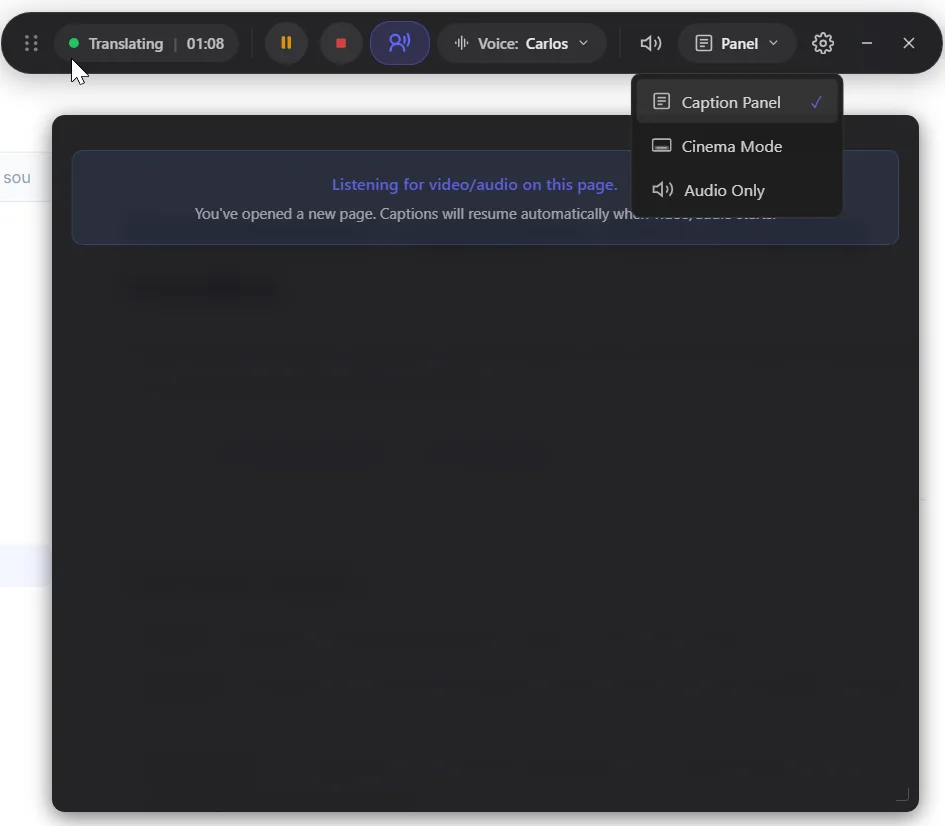
The three modes
- Panel — captions sit docked beside the video, in their own column, with the earlier lines kept so you can scroll back.
- Cinema — captions run across the picture, the way subtitles normally do. You can drag them wherever they fit.
- Audio Only — no captions at all, just the translated voice. DubTab folds into a small bar on the page; click it to bring the captions back. If the voice was off, choosing Audio Only turns it on.
Both languages, or just the translation
Bilingual subtitles show the original line and the translated line together. That is the right setting when you are learning the source language, or when you want to check a translation you do not quite trust. Turn it off and you get the translation alone, which is easier to read at a glance.
Which line goes on top
- 1Open Settings in the dock
The gear button.
- 2Choose under Caption Order
Translation first or Original first.
- 1Open Caption appearance
The A button.
- 2Choose under Line order
Translation on top or Original on top. It applies when both languages are on screen.
Size and background
- 1Open Settings in the dock
The gear button.
- 2Font Size
Sizes the captions you are looking at: the panel in Caption Panel, the subtitles in Cinema Mode. Each mode keeps its own size.
- 3Background Opacity
Drag it all the way to the left and the box disappears. In Cinema the captions then get a black outline instead, the classic subtitle look, so they stay readable on any picture.
- 1Open Caption appearance
The A button.
- 2Size each line
Two sliders size the original line and the translation separately. You can also pick the translation's typeface and the colours.
- 3Background Opacity
Drag it all the way to the left and the box disappears. The captions get a black outline instead, so they stay readable on any picture.
Where they appear
- 1Captions live inside the page
Panel docks them next to the video; Cinema puts them across the picture. Switch modes from the dock at any time.
- 2Drag the Cinema subtitles where they fit
Grab them anywhere and drag. DubTab remembers the spot separately for each website, because every player puts its controls somewhere else. Longer lines grow upward from where you left them. Double-click the subtitles to put them back in the default place.
- 3Make them wider or narrower
With the translated voice off, point at the subtitles and drag their left or right edge. Double-click an edge to go back to the default width.
- 4Scroll back in the panel
In Caption Panel, scroll up to reread earlier lines; the scrollbar shows while you do. Follow Voice at the bottom, or the arrow when the voice is off, takes you back to the live line.
- 5They follow the tab
Captions belong to the tab being translated. Switching to another tab leaves them behind with the session.
- 1Captions float over every window
The HUD stays on top of whatever you are doing, so the video does not have to be in front.
- 2Click-through and Cinema
Click-through lets the mouse pass straight through the captions. Cinema steps the main window aside and leaves just the captions on screen: the line being spoken, or, with dubbing off, the new line with the one before it kept above, dimmed. The tray can also hide captions entirely without stopping the session.
- 3Drag them, and drag their edges
Drag the captions anywhere on the picture, and double-click to put them back. With Dub off, drag their left or right edge to make them wider or narrower; double-click the edge for the default width.
- 4Hide the Cinema toolbar
Turn it on in Settings and Cinema shows nothing but the captions, which is handy when you share or record your screen. Right-click the captions for the controls: pause or resume, Stop and save to Sessions, Show toolbar and Open app.
With the translated voice off
Cinema subtitles then behave like live TV subtitles, in the extension and the desktop app alike:
- The line before stays on screen, dimmed, above the new one, and the subtitles roll up when the next line arrives. A long line no longer disappears before you have finished reading it.
- A translation shows up as soon as it is ready, without waiting for the end of the sentence.
- Every line starts at the same edge and keeps the same width. A line too long for one row splits into two even rows, and a line that keeps growing shows two rows at most, the earlier ones scrolling up.
With the voice on, the subtitles stay a single centred line that follows the voice.
Common questions
Can I have the dubbed voice without any captions?
Yes. In the extension, choose Audio Only; it also turns the translated voice on if it was off. In the desktop app, choose Hide captions in the tray menu and the session keeps running.
Do the floating captions block what is underneath?
Not if click-through is on — the mouse passes straight through the caption layer to the window behind it. This is a desktop app feature; in the extension captions sit inside the page and never cover other windows.
Can I see the original language as well as the translation?
Yes. Bilingual subtitles put the original line and the translated line on screen together. Turn it off for the translation alone.
My Cinema subtitles sit somewhere else on another site.
That is on purpose. The extension remembers where you put them separately for each website, because players put their controls in different places. Double-click the subtitles to reset them on the site you are on.
I chose the original on top, but Cinema shows the translation first.
With the translated voice off, Cinema always puts the translation on top, right under the line before it, so that two translations sit next to each other. Turn the voice on and your choice applies again.