Save and replay dubbed audio
Keep the translated voice track from a session so you can listen to it again later. The switch has to be on before you press Start.
Before you start
Saving records the dubbed voice, the audio DubTab generates itself. If the translated voice is switched off for a session, there is nothing to record — you still get the captions and the transcript.
Turn on saving
- 1Open the DubTab popup
Click the DubTab icon in the toolbar. If it is not there, open the puzzle-piece menu and pin DubTab.
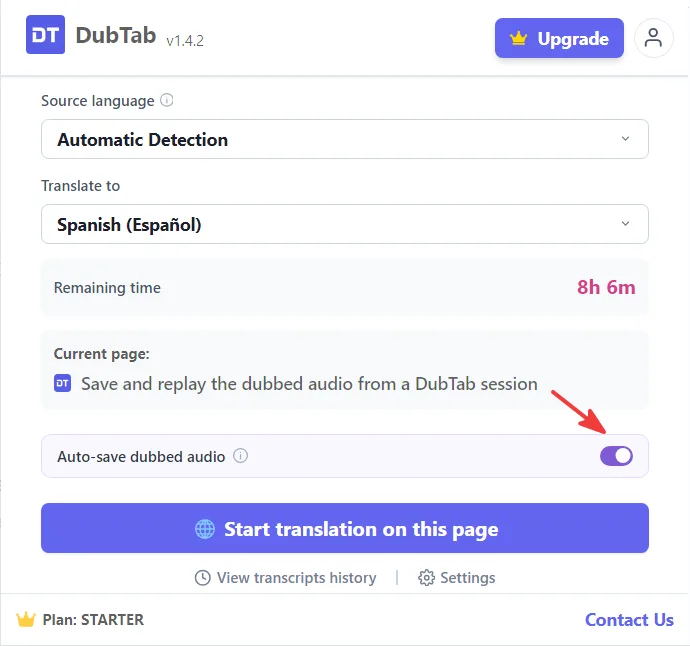
- 2Switch on Auto-save dubbed audio
It sits in the popup, right above Start, and in Settings too. New installs start with it on; if you had DubTab before this switch arrived, it starts off. Once set, it stays that way for later sessions. It is greyed out while the translated voice is off.
- 3Check that the translated voice is on
With the voice off there is nothing to record, and the session saves a transcript only.
- 4Press Start
This is the moment the setting is read. Everything after this point is recorded, nothing before it is.
- 1Find Auto-save dubbed audio on the Home screen
It sits just under the Start translation button, next to the note about capturing system audio — you do not have to go into Settings for it.
- 2Switch it on
New installs start with it on; if you had DubTab before this switch arrived, it starts off. Once set, it stays that way for later sessions.
- 3Check that the translated voice is on
With the voice off there is nothing to record, and the session saves a transcript only.
- 4Press Start translation
This is the moment the setting is read. Everything after this point is recorded, nothing before it is.
Find and replay it
Stop the session, then open your history. The session carries a play button alongside its transcript. A long session can sit at Pending for a short while after you stop, while the recording finishes being put together.
Common questions
I stopped the session but there is no recording.
Two things are read at Start and both have to be on: saving of dubbed audio, and the translated voice itself. If either was off at the moment you pressed Start, the session saved a transcript only. Turning either on during the session does not apply to it retroactively.
Does saving record the original speaker as well?
No. Only the translated voice DubTab generates is recorded. The original audio is streamed for translation and never stored, so a saved recording contains the dub and nothing else.
The recording says Pending.
The audio is still being finished after the session stopped. Long sessions take longer. If it stays that way, the transcript is unaffected and you can still read and export it.